

Table of Contents
Version Control
VersionDateDescriptionAuthor
19/07/2021 - v1.0 - Published
20/07/2021 - v1.1 - Added IPv6 config
14/09/2021 - v1.2 - Added disclaimer
16/10/2021 - v1.3 - Updated Configuration to have VDSL and FTTP
Prerequisites
To get a Juniper SRX to work with Sky Broadband you will need:
Juniper SRX320 or bigger (needs the Mini PIM slot)
Juniper SRX-MP-1VDSL2-A (part number 750-025184)
Your Sky broadband username and password
To establish your Sky Broadband service you need to:
Insert the VDSL MP into the next available slot and make sure it’s registered:
show chassis hardware
Hardware inventory:
Item             Version  Part number  Serial number     Description
Chassis                                CW0818AF0883      SRX320
Routing Engine   REV 0x13 650-065040   CW0818AF0883      RE-SRX320
FPC 0                                                    FPC
  PIC 0                                                  6xGE,2xGE SFP Base PIC
FPC 1            REV 19   750-025184   ACNF8918          FPC
  PIC 0                                                  1x VDSL2 Annex A
As you can see from the above, mines inserted into slot 1 of my SRX.
Implementation/Config
Overview
Connect the VDSL MP of your SRX directly to your phone line socket using the appropriate cable.
Use the following configuration to connect your SRX to your Sky broadband connection (the following assumed that the VDSL MP is in slot 1 of your SRX):
Variables
Configuration
VDSL
set interfaces $VDSL_INTERFACE description $DESCRIPTION_OF_YOUR_CHOICE$
set interfaces $VDSL_INTERFACE vlan-tagging
set interfaces $VDSL_INTERFACE vdsl-options vdsl-profile auto
set interfaces $VDSL_INTERFACE unit 101 description "$DESCRIPTION_OF_YOUR_CHOICE$"
set interfaces $VDSL_INTERFACE unit 101 vlan-id 101
set interfaces $VDSL_INTERFACE unit 101 family inet dhcp options number 61 hex-string $SKY_BROADBAND_USERNAME$|$SKY_BROADBAND_PASSWORD$
set interfaces $VDSL_INTERFACE unit 101 family inet6 dhcpv6-client client-type stateful
set interfaces $VDSL_INTERFACE unit 101 family inet6 dhcpv6-client client-ia-type ia-pd
set interfaces $VDSL_INTERFACE unit 101 family inet6 dhcpv6-client rapid-commit
set interfaces $VDSL_INTERFACE unit 101 family inet6 dhcpv6-client client-identifier duid-type duid-ll
set interfaces $VDSL_INTERFACE unit 101 family inet6 dhcpv6-client req-option dns-server
set interfaces $VDSL_INTERFACE unit 101 family inet6 dhcpv6-client update-router-advertisement interface $LAN_INTERFACE$
set interfaces $VDSL_INTERFACE unit 101 family inet6 dhcpv6-client update-server
FTTP
set interfaces $WAN_INTERFACE description $DESCRIPTION_OF_YOUR_CHOICE$
set interfaces $WAN_INTERFACE unit 0 description "$DESCRIPTION_OF_YOUR_CHOICE$"
set interfaces $WAN_INTERFACE unit 0 family inet dhcp options number 61 hex-string $SKY_BROADBAND_USERNAME$|$SKY_BROADBAND_PASSWORD$
set interfaces $WAN_INTERFACE unit 0 family inet6 dhcpv6-client client-type stateful
set interfaces $WAN_INTERFACE unit 0 family inet6 dhcpv6-client client-ia-type ia-pd
set interfaces $WAN_INTERFACE unit 0 family inet6 dhcpv6-client rapid-commit
set interfaces $WAN_INTERFACE unit 0 family inet6 dhcpv6-client client-identifier duid-type duid-ll
set interfaces $WAN_INTERFACE unit 0 family inet6 dhcpv6-client req-option dns-server
set interfaces $WAN_INTERFACE unit 0 family inet6 dhcpv6-client update-router-advertisement interface $LAN_INTERFACE$
set interfaces $WAN_INTERFACE unit 0 family inet6 dhcpv6-client update-server
Why DHCP Options and not JDHCPD?
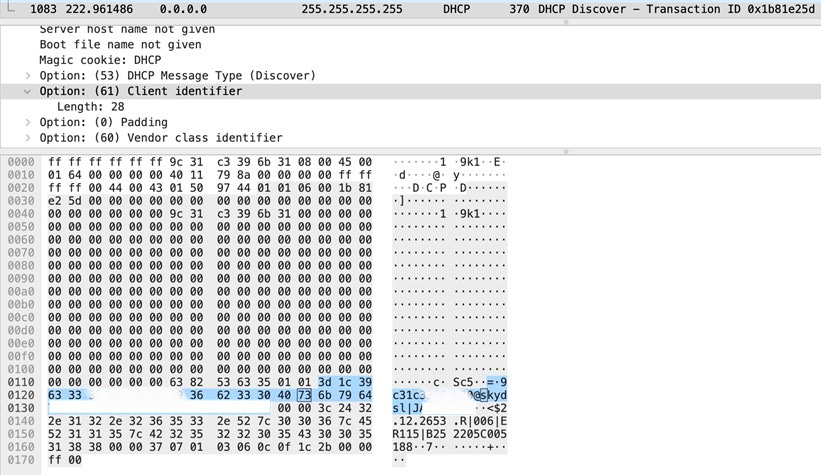
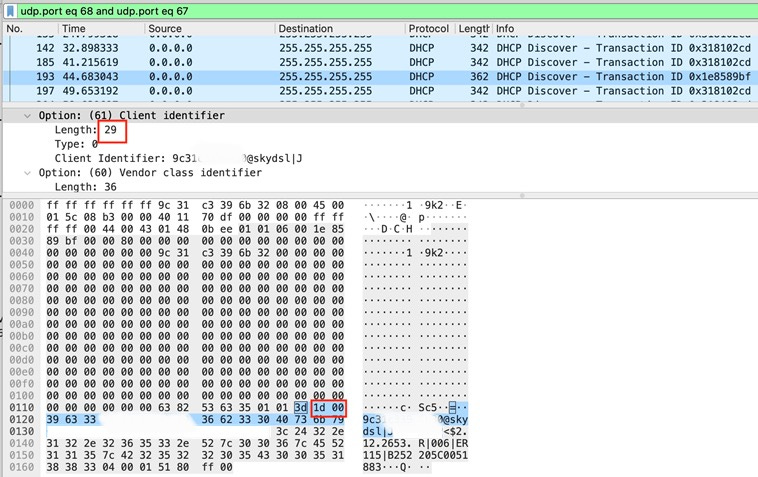
The reason for using DHCP options, rather than client-identifier is because JDHCPD follows RFC2132 which by the standard adds a “00” to the packet header. However Sky is not compliant with RFC2132 and just wants a raw string for it’s username and password.
Sky CPE Output
SRX JDHCPD Output
Note that JDHCP/RFC2132 option 61 length is 29 due to the “00”
Checks/Confirmation
DSL Sync
From the CLI to confirm your DSL is in sync
show interfaces pt-1/0/0 extensive | match "profile|annex|error|bit"
  Input errors:
    Errors: 0, Drops: 0, Policed discards: 2, L3 incompletes: 0, L2 channel errors: 0, L2 mismatch timeouts: 0, Resource errors: 0
  Output errors:
    Carrier transitions: 1, Errors: 0, Drops: 0, Aged packets: 0, MTU errors: 0, Resource errors: 0
    Modem status  : Showtime (Profile-17a)
    VDSL profile  :     Auto    Annex B
    Bit rate (kbps)   :                32263          0        4876          0
    Flow error statistics (Packets dropped due to):
      Incoming NAT errors:               0
      User authentication errors:        0
    Flow error statistics (Packets dropped due to):
      Incoming NAT errors:               0
      User authentication errors:        0
You can also confirm the SNR with:
show interfaces pt-1/0/0 extensive | match "vtu|db"
  VDSL Chipset Information:               VTU-R                  VTU-C
  VDSL Statistics:                        VTU-R                  VTU-C
    Attenuation (dB)         :              0.0                    0.0
    Noise margin (dB)        :              5.5                    6.0
    Output power (dBm)       :              2.0                    2.0
Broadband Connection State
As this is DHCP based, rather than PPP, to confirm that your SRX has connected to your Sky broadband you can use the following commands:
show dhcp client binding

IP address        Hardware address   Expires     State      Interface
AAA.BBB.CCC.DDD   64:c3:d6:AA:BB:CC  2282        BOUND      pt-1/0/0.101


show dhcpv6 client binding

IP/prefix                       Expires     State      ClientType    Interface       Client DUID
2a02:c7f:AAAA:BBBB::/56         2043        BOUND      STATEFUL      pt-1/0/0.101    LL0xd-64:c3:d6:AA:BB:CC
or
show interfaces terse
<SNIP>
pt-1/0/0.101            up    up   inet     AAA.BBB.CCC.DDD/22
                                   inet6    fe80::66c3:d600:65c2:142a/64
pt-1/0/0.32767          up    up
<SNIP>
irb.10                  up    up   inet     192.168.0.1/24
                                   inet6    2a02:c7f:AAAA:BBBB::1/64
                                            fe80::66c3:d600:ac2:14b0/64
or
show route table inet.0 protocol access-internal | match /0
0.0.0.0/0          *[Access-internal/12] 02:47:55, metric 0
                    >  to AAA.BBB.CCC.1 via pt-1/0/0.101


show route table inet6.0 protocol access-internal

inet6.0: 8 destinations, 8 routes (8 active, 0 holddown, 0 hidden)
+ = Active Route, - = Last Active, * = Both

::/0               *[Access-internal/12] 02:32:11
                    >  to fe80::a2f3:e4ff:fe5d:9230 via pt-1/0/0.101
2a02:c7f:AAA:BBB::/56
                   *[Access-internal/12] 02:32:12
                       Reject
DHCP Troubleshooting
The following links cover what’s needed to troubleshoot your SRX as a DHCP client:
References and Contributors
References
The following articles helped me along the way:
Making a modern SRX work with Sky VDSL – https://untrust.zone/making-a-modern-srx-work-with-sky-vdsl/
JUNIPER SRX on SKY Fibre Broadband – http://www.ddrcomputing.co.uk/juniper-funk/junipersrx
IPv6 on SRX – https://blog.netpro.be/ipv6-on-juniper-srx-prefix-delegation-dhcpv6/