


Table of Contents
Version Control
01/08/202 - v0.1 - 1Initial draft
14/07/2021 - v0.2 - Draft. Updated with Control Plane vs. Protocol Protection
16/10/2021 - v1.0 - Final revision for publication
25/11/2021 - v1.1 - Added BGP
Overview
After several years of operating different sizes of networks, I have created the following template to cover most operational circumstances. Therefore, please take the notes below as a guide, and not an exact template.
Control Plane vs. Data Plane vs. Protocol Protection
Control Plane
The key to this part of the guide is what packet is sent to the control plane (routing engine), what what is processed by the data plane (packet forwarding engine (PFE)).
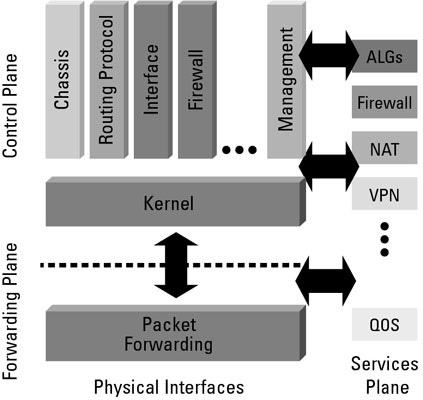
As you can see from the diagram above when applying control plane protection you need to take into consideration what it is you want to permit and what will be blocked by the deny-all at the end of a policy.
Data Plane Protection
Once a protocol is turned on, you may want to block external access, as Junos will open the protocol port on all interfaces – https://kb.juniper.net/InfoCenter/index?page=content&id=KB21222&cat=SRX_SERIES&actp=LIST.
Protocol Protection
This can be summed up simply as only permit the prefixes, AS’s, communities, TLV’s … etc., that you wished to be processed by that specific protocol. And only enable the protocols you want to use.
Key Considerations
TCAM – does the device have enough memory to support a large or condensed ACL?
Purpose – What is the purpose of the ACL? Protect the control plane? Protect the interface? Protect the protocol?
Operational – One long policy or several policies created per process/protocol?
Security – Deny-all is your friend and only permit what you need (with the exception of interfaces/data plane protection).
Out of Scope
Hardening configuration for:
SSH
AAA/System login
NETCONF
Web-UI
Mangement interface
SNMP
Implementation/Config
Control Plane
Assumptions
All management, OSS and AAA will be done via IPv4. If you want to add IPv6, then update the IPv6 section of the guide below.
AAA will be done via RADIUS, so please update the guide as need to support your IPv6 architecture.
Variables
Configuration
set system default-address-selection
set system no-redirects
set system no-ping-record-route
set system no-ping-time-stamp
set system internet-options tcp-drop-synfin-set
set system internet-options no-source-quench
set system internet-options no-tcp-reset drop-tcp-with-syn-only
set system ports console log-out-on-disconnect
set system ports console insecure
set system ports auxiliary disable
set system ports auxiliary insecure
set system diag-port-authentication encrypted-password $DIAG_PORT_ENCRYPTED_PASSWORD
set system pic-console-authentication encrypted-password $PIC_CONSOLE_ENCRYPTED_PASSWORD


set interfaces lo0 unit 0 family inet filter input [ synflood-protect allow-bgp-v4 allow-ospf-v4 allow-rsvp allow-ssh allow-snmp allow-ntp allow-radius icmp-frags allow-icmp allow-traceroute tcp-established default-deny ]

set interfaces lo0 unit 0 family inet6 filter input [ allow-bgp-v6 allow-ospf-v6 icmp-frags allow-icmp allow-traceroute tcp-established default-deny ]


set policy-options prefix-list bgp-neighbors-v4 apply-path "protocols bgp group <*>-$V4 neighbor <*>"
set policy-options prefix-list bgp-neighbors-v6 apply-path "protocols bgp group <*>-$V6 neighbor <*>"

set policy-options prefix-list ipv4-interfaces apply-path "interfaces <*> unit <*> family inet address <*>"
set policy-options prefix-list ipv6-interfaces apply-path "interfaces <*> unit <*> family inet6 address <*>"


set policy-options prefix-list ospf-all-routers-v4 224.0.0.5/32
set policy-options prefix-list ospf-all-routers-v4 224.0.0.6/32
set policy-options prefix-list ospf-all-routers-v6 ff02::5/128
set policy-options prefix-list ospf-all-routers-v6 ff02::6/128
set policy-options prefix-list ntp-servers apply-path "system ntp server <*>"
set policy-options prefix-list snmp-servers apply-path "snmp community <*> clients <*>"
set policy-options prefix-list mgmt-nets $MGMT_SUBNET
set policy-options prefix-list radius-servers apply-path "system radius-server <*>"
set policy-options prefix-list localhost 127.0.0.1/32


set firewall family inet filter synflood-protect term synflood-protect from source-prefix-list bgp- neighbors-v4
set firewall family inet filter synflood-protect term synflood-protect from source-prefix-list mgmt-nets
set firewall family inet filter synflood-protect term synflood-protect from protocol tcp
set firewall family inet filter synflood-protect term synflood-protect from tcp-flags "(syn & !ack) | fin | rst"
set firewall family inet filter synflood-protect term synflood-protect then policer limit-100k
set firewall family inet filter synflood-protect term synflood-protect then accept

set firewall family inet filter allow-bgp-v4 term allow-bgp-v4 from source-prefix-list bgp-neighbors-v4
set firewall family inet filter allow-bgp-v4 term allow-bgp-v4 from destination-prefix-list ipv4-interfaces
set firewall family inet filter allow-bgp-v4 term allow-bgp-v4 from protocol tcp
set firewall family inet filter allow-bgp-v4 term allow-bgp-v4 from destination-port bgp
set firewall family inet filter allow-bgp-v4 term allow-bgp-v4 then accept

set firewall family inet filter allow-ospf-v4 term allow-ospf-v4 from source-prefix-list ipv4-interfaces
set firewall family inet filter allow-ospf-v4 term allow-ospf-v4 from destination-prefix-list ospf-all-routers-v4
set firewall family inet filter allow-ospf-v4 term allow-ospf-v4 from destination-prefix-list ipv4-interfaces
set firewall family inet filter allow-ospf-v4 term allow-ospf-v4 from protocol ospf
set firewall family inet filter allow-ospf-v4 term allow-ospf-v4 then accept

set firewall filter inet filter allow-rsvp term allow-rsvp from destination-prefix-list ipv4-interfaces
set firewall filter inet filter allow-rsvp term allow-rsvp from protocol rsvp
set firewall filter inet filter allow-rsvp term allow-rsvp then accept

set firewall family inet filter allow-ssh term allow-ssh from source-prefix-list mgmt-nets
set firewall family inet filter allow-ssh term allow-ssh from protocol tcp
set firewall family inet filter allow-ssh term allow-ssh from destination-port ssh
set firewall family inet filter allow-ssh term allow-ssh then policer limit-10m
set firewall family inet filter allow-ssh term allow-ssh then accept

set firewall family inet filter allow-snmp term allow-snmp from source-prefix-list snmp-servers
set firewall family inet filter allow-snmp term allow-snmp from protocol udp
set firewall family inet filter allow-snmp term allow-snmp from destination-port snmp
set firewall family inet filter allow-snmp term allow-snmp then policer limit-1m
set firewall family inet filter allow-snmp term allow-snmp then accept

set firewall family inet filter allow-ntp term allow-ntp from source-prefix-list ntp-servers
set firewall family inet filter allow-ntp term allow-ntp from source-prefix-list localhost
set firewall family inet filter allow-ntp term allow-ntp from protocol udp
set firewall family inet filter allow-ntp term allow-ntp from destination-port ntp
set firewall family inet filter allow-ntp term allow-ntp then policer limit-32k
set firewall family inet filter allow-ntp term allow-ntp then accept

set firewall family inet filter allow-radius term allow-radius from source-prefix-list radius-servers
set firewall family inet filter allow-radius term allow-radius from protocol udp
set firewall family inet filter allow-radius term allow-radius from source-port radius
set firewall family inet filter allow-radius term allow-radius from source-port radacct
set firewall family inet filter allow-radius term allow-radius then policer limit-32k
set firewall family inet filter allow-radius term allow-radius then accept

set firewall family inet filter icmp-frags term icmp-frags from is-fragment
set firewall family inet filter icmp-frags term icmp-frags from protocol icmp
set firewall family inet filter icmp-frags term icmp-frags then syslog
set firewall family inet filter icmp-frags term icmp-frags then discard

set firewall family inet filter allow-icmp term allow-icmp from protocol icmp
set firewall family inet filter allow-icmp term allow-icmp from icmp-type echo-request
set firewall family inet filter allow-icmp term allow-icmp from icmp-type echo-reply
set firewall family inet filter allow-icmp term allow-icmp from icmp-type unreachable
set firewall family inet filter allow-icmp term allow-icmp from icmp-type time-exceeded
set firewall family inet filter allow-icmp term allow-icmp then policer limit-1m
set firewall family inet filter allow-icmp term allow-icmp then accept

set firewall family inet filter allow-traceroute term allow-traceroute from protocol udp
set firewall family inet filter allow-traceroute term allow-traceroute from destination-port 33434-33523
set firewall family inet filter allow-traceroute term allow-traceroute then policer limit-1m
set firewall family inet filter allow-traceroute term allow-traceroute then accept

set firewall family inet filter tcp-established term tcp-established from protocol tcp
set firewall family inet filter tcp-established term tcp-established from source-port ssh
set firewall family inet filter tcp-established term tcp-established from source-port bgp
set firewall family inet filter tcp-established term tcp-established from tcp-established
set firewall family inet filter tcp-established term tcp-established then policer limit-10m
set firewall family inet filter tcp-established term tcp-established then accept

set firewall family inet filter default-deny then log
set firewall family inet filter default-deny then syslog
set firewall family inet filter default-deny then discard


set firewall family inet6 filter allow-bgp-v6 term allow-bgp-v6 from source-prefix-list bgp-neighbors-v6
set firewall family inet6 filter allow-bgp-v6 term allow-bgp-v6 from destination-prefix-list ipv6-interfaces
set firewall family inet6 filter allow-bgp-v6 term allow-bgp-v6 from protocol tcp
set firewall family inet6 filter allow-bgp-v6 term allow-bgp-v6 from destination-port bgp
set firewall family inet6 filter allow-bgp-v6 term allow-bgp-v6 then accept

set firewall family inet6 filter allow-ospf-v6 term allow-ospf-v6 from source-prefix-list ipv6-interfaces
set firewall family inet6 filter allow-ospf-v6 term allow-ospf-v6 from destination-prefix-list ospf-all-routers-v6
set firewall family inet6 filter allow-ospf-v6 term allow-ospf-v6 from destination-prefix-list ipv6-interfaces
set firewall family inet6 filter allow-ospf-v6 term allow-ospf-v6 from protocol ospf
set firewall family inet6 filter allow-ospf-v6 term allow-ospf-v6 then accept

set firewall family inet6 filter icmp-frags term icmp-frags from is-fragment
set firewall family inet6 filter icmp-frags term icmp-frags from protocol icmp
set firewall family inet6 filter icmp-frags term icmp-frags then syslog
set firewall family inet6 filter icmp-frags term icmp-frags then discard

set firewall family inet6 filter allow-icmp term allow-icmp from protocol icmp
set firewall family inet6 filter allow-icmp term allow-icmp from icmp-type echo-request
set firewall family inet6 filter allow-icmp term allow-icmp from icmp-type echo-reply
set firewall family inet6 filter allow-icmp term allow-icmp from icmp-type unreachable
set firewall family inet6 filter allow-icmp term allow-icmp from icmp-type time-exceeded
set firewall family inet6 filter allow-icmp term allow-icmp then policer limit-1m
set firewall family inet6 filter allow-icmp term allow-icmp then accept

set firewall family inet6 filter allow-traceroute term allow-traceroute from protocol udp
set firewall family inet6 filter allow-traceroute term allow-traceroute from destination-port 33434-33523
set firewall family inet6 filter allow-traceroute term allow-traceroute then policer limit-1m
set firewall family inet6 filter allow-traceroute term allow-traceroute then accept

set firewall family inet6 filter tcp-established term tcp-established from protocol tcp
set firewall family inet6 filter tcp-established term tcp-established from source-port ssh
set firewall family inet6 filter tcp-established term tcp-established from tcp-established
set firewall family inet6 filter tcp-established term tcp-established then policer limit-10m
set firewall family inet6 filter tcp-established term tcp-established then accept

set firewall family inet6 filter default-deny then log
set firewall family inet6 filter default-deny then syslog
set firewall family inet6 filter default-deny then discard


set firewall policer limit-32k if-exceeding bandwidth-limit 32k
set firewall policer limit-32k if-exceeding burst-size-limit 15k
set firewall policer limit-32k then discard

set firewall policer limit-100k if-exceeding bandwidth-limit 100k
set firewall policer limit-100k if-exceeding burst-size-limit 15k
set firewall policer limit-100k then discard

set firewall policer limit-1m if-exceeding bandwidth-limit 1m
set firewall policer limit-1m if-exceeding burst-size-limit 15k
set firewall policer limit-1m then discard

set firewall policer limit-3m if-exceeding bandwidth-limit 3m
set firewall policer limit-3m if-exceeding burst-size-limit 15k
set firewall policer limit-3m then discard

set firewall policer limit-10m if-exceeding bandwidth-limit 10m
set firewall policer limit-10m if-exceeding burst-size-limit 625k
set firewall policer limit-10m then discard
BGP
TTL
As TTL is decremented as it passed from one device to another (accept in certain tunnelling circumstances), we can protect our P2P BGP neighbour-ships using the TTL.
Variables
Router 1
set $P2P_INTERFACE family inet filter input BGP-TTL

edit firewall filter BGP-TTL
edit term TTL
set from source-address $P2P_PREFIX
set from protocol tcp
set from ttl-except 255
set from port 179
set the discard
up
edit term then-accept
set then accept
top
Router 2
set protocol bgp group $GROUP ttl 255

or

set protocol bgp group $GROUP neighbor $NEIGHBOUR_IP ttl 255
Data Plane
Variables
Configuration
set protocols lldp interface all disable
set protocols lldp interface $LLDP_INTERFACE
Protocol
Variables
Configuration
set protocols ldp session $LDP_NEIGHBOUR_IP authentication-key $LDP_PASSWORD

set protocols rsvp interface $RSVP_INTERFACE.$UNIT authentication-key $RSVP_PASSWORD
References and Contributors
References
Hardening
https://www.juniper.net/assets/kr/kr/local/pdf/books/tw-hardening-junos-devices-checklist.pdf
https://www.juniper.net/documentation/jnbooks/us/en/day-one-books > https://www.juniper.net/documentation/en_US/day-one-books/TW_HardeningJunosDevices_2ndEd.zip
https://kb.juniper.net/library/CUSTOMERSERVICE/Securing_RouteEngine2.pdf
https://www.oreilly.com/library/view/juniper-mx-series/9781449358143/ch04s01.html
TCAM
ACX – https://kb.juniper.net/InfoCenter/index?page=content&id=KB35363&actp=RSS and https://www.juniper.net/documentation/us/en/software/junos/network-mgmt/topics/topic-map/monitoring-and-troubleshooting-resources.html#id-troubleshooting-and-monitoring-tcam-resource-in-acx-series-routers
EX/QFX – https://kb.juniper.net/InfoCenter/index?page=content&id=KB30953